
Showing posts with label Marketing. Show all posts
Showing posts with label Marketing. Show all posts
Friday, 10 March 2017

Saturday, 4 February 2017
ALL YOU NEED TO KNOW ABOUT FACEBOOK.
There are some interesting features in facebook, which we usually don't know how to use and what are their benefits.
Who logged in your account?
Who logged in your account?
If you found any type of phishing activity in your account then you can check by yourself following the follow steps
- Go to your settings page.
- Check the Security folder.
- You'll find a link "Where You're Logged In." Here you will get all the information about your active Facebook log-ins from desktop or mobile. It will (usually) tell the location, browser, and device.
- If something seems wrong, you can do "end activity" on all devices.
This will also help when you logged into your friend's computer or on some public cafe but forgot to log out.
Remote logout from your account.
- Login your account
- Go to Security Settings.
- Click on the Where You're Logged In section.
- Find the session you want to end and click End Activity.

Schedule Posts
- Write the post in your timeline
- After writing, while publishing click on dropdown which is next to Publish.
- Select Schedule where you can select a date, time for a future post. And if you want you can change the date of publishing post in back date.
- If you want you can stop the sharing of your post after a time period. Like you post an offer which will end after the certain time period you can set that time period also, which known as distribution schedule.
Targeting your Facebook fans according to location or country
If you want to target the people of certain location, country, region or city, means while publishing your post you can select the location where particular you want to distribute your post, like you are publishing a post another language than English for those people who can speak that language then you can use this option. With this option, you can control your post’s audience also by selecting age or gender.
How to control About Section?
Although one has to use this section as maximum he can because this is a real picture of you, your business or your product. You must aware that the information given in this section will display in Facebook search, google, Bing and other search engines. But still, if you want to hide your about section then do the following steps.
- Go to your profile
- Below your cover photo, hover over more and then select Manage Sections at the bottom
- Click to check or uncheck the sections you want to unhide or hide and then click Save
How do I control Timeline?
- You can select the persons who can add things to your timeline. For security person, you should select this only me.
- Same you can select the persons who can see your timeline.
How do I control Tagline?
- You can review tag people add to your own post before appearing on Facebook.
- You can add people when you get tagged in a post.
- How to control Facebook Advert?
- You can manage the preferences of Facebook ads.
- You can see internet-based adverts.
How to delete Your Facebook Account?
One day when you realize that this virtual world is good enough only for promotions of your products and want to turn back to green earth from blue earth then click on the following green button.

Hopefully, you like the article. please share your comments on below comment box.
Sunday, 22 January 2017
THE ULTIMATE GUIDE TO TWITTER
Twitter, Almost every person must familiar with this word nowadays because of the news ticker which always full of twitter trendsJ. Jokes apart, this is the one of the powerful medium of sharing your opinion online. Although, it has only 140 character limit but still every big company has account with this social platform. The terminology used in it is very special like:
Twitter Handler: Account created in twitter know as twitter handler.
Tweet: The message posted by a user in the form of text, link, image or video.
Reply: Respond given to any one tweet.
Retweet: Retweet is to sharing someone tweet with your followers.
Like: Bookmarking the tweet you like.
Hashtag: Any word starts with # symbol without space, act as tags.
Mention: Someone use your username @username in their message, like mentioning you for some specific reason like asking a question.
Some Stats:
Twitter is used as
Customer care (66%) | For purchase purpose (94%) | For Sales (69%) |
Most of well establish companies take direct questions or complaints from their twitter handles. | Users purchase from SMB they follow. | Take orders directly with the help of @Reply or @DM |
Tools use in twitter:
Twitter Toolbar: The top search bar is used to search any type of tweet, but make sure if you are looking for particular tweet then use #keyword, and if looking for a particular account then use @username.
Hashtags.org: As I told before #keyword is acted as tags in twitter and known as hashtags. Theses hashtags are managed by hashtags.org.
KeyHole.co: KeyHole.co is a search engine used to search for hashtags and keywords in twitter and Instagram.
Buzzsumo.com: This is another option, in which you can do a search according to the time frame like 24 hrs. Before, or past year. Best option to keep eye on your competitors and niche market and trending topics.
Tweetreach.com: This service is used to get a full report about your tweets, account or any specific keyword. It will tell your tweet reach to how many accounts and much more.

Yfrog.com: This is image hosting service which shortens the URL(the web address which we type in the address bar of a browser) up to 140 characters so that, those can be tweet easily.
YouTube.com: You can share the direct link to videos from youtube in your tweets.
AudioBoom.com: Like YouTube, audioboom.com is used to share your audios on twitter in the form of links. These audios called podcasts.
Tweetups: Tweetups start with the hashtag. Basically, this a face to face meeting organize by a person for individuals or group of people. These type of meetings convert your 140 characters long tweets to full conversations.
Where exactly twitter is use in business?
Twitter is use to Generate Publicity about your products, services, brands or company. You can share products or coupons through tweets and your followers must consider your coupons at least for once. This can be used to increase Brand Awareness by tweeting at least 4-5 times per day. Email Subscription is the latest feature, given by twitter so you can easily manage your subscriber lists. Yes, you can put subscribe button in your twitter account with the help of twitter cards and ask your followers to subscribe to it. These twitter cards give one-click signup button and if anyone clicks on that button then automatically his/her email address added to your newsletter. Because of this, no one needs to fill out the form or confirm/activate the link. Also, you can drive traffic to your website or blog by sharing your website or blog links.
Some other tips
- You follow me, I will follow you this is the key rule to get more followers on twitter. You can follow maximum 2000 users from one account.
- If you want quality and engage followers, find out the targeted keywords tweets. You can click on the favorite button of those tweets and ask them to follow you.
- Same like click on a favorite, you can offer something like eBook, information in the exchange of following you.
- Always be particular about your tweet created by you, it should be original and fit into your purpose.
- Use headiness in the form of lists, how to, refer some famous personality, use keywords, so users get attracted easily.
- Tweet your content at least 4-5 times per day.
- Connect all your social platforms with Facebook, LinkedIn or blogs.
- Always track your results with Twitter analytics.
- Use Buffer App or hoot suite to share your tweets on other social media platforms.
- Optimize your Twitter bio.
- Organize whom you follow with lists and conversion lists.
- Create a Twitter landing page.
- Try to use google keyword planner while searching in twitter so you can get trending and top tweets in your search.
- Use social media tools, like Klout.com, Peerindex.com, Kred.com, Wefollow.com to check your score.
After all, this, if I say that twitter itself become a very powerful medium to grow your business then it is not wrong.
Hopefully, you like the article. Please share your comments below comment box and give some more suggestions about how to use twitter properly?
Wednesday, 11 January 2017
10 PROVEN WAYS TO FIND LEADS FOR YOUR BUSINESS
I already discuss with you how to start a company, or how to decide target audience for your business. Today we will discuss how we can generate leads for our business. I am sure you all heard about these but if you found something new or want to share something new please do comments in following comment box.
Twitter: Yes, twitter helps you to generate business leads as twitter has millions of users around the world so you can imagine. There are so many ways like use hashtags, search keywords related to your business, share the links, use images and videos, in short, do not make your tweets boring make it a bit interesting so the audience gets attracted to them. Along with learning properly how to use twitter cards or twitter. Search.or twitter. Search.
Infographic: what is an infographic? Information shows by graphics,. but its true you have seen so many infographics nowadays, check my previous post where I put infographics my favorite new year resolutions, it is not only entertaining but also easy to understand. Now how it helps to generate leads. Everyone use subscription or sign up forms on their website, try to put as much information you can put there beside the form and it will become your first infographic.Same if we sharing infographics in social media platforms they got more likes and shares rather than links or text.Think yourself how much links you share today?
Webinars: Another interesting way to generate leads, webinar means web base seminar, Where an organizer organize an online presentation and participants can attend his or her presentation through your computer, browser, speaker, and microphone from the home only. The only way to get register for participants to a webinar is their email address. In this way, an organizer can get easily email addresses of their niche customers in the form of participants.
LinkedIn: A research said 44% of business leads generate by LinkedIn. Everyone know that LinkedIn is purely dedicated to professionals either for jobs or business rather than other social media platforms. In LinkedIn, you can create your own or can send your posts to other groups. The main thing promotes your products only in your niche group for better results. Along with you can make your connections only with those you fit into your buyer’s profile. And this way you can easily get 500-1000 leads in the week for your business, as we know linked have almost 400 million users registered.

Use advanced technology/apps/tools for marketing: As I mention before, infographics, webinars there are some apps or websites also who help in your marketing and save your time like email software, automatic publish your tweets or posts. Sendblaster is most commonly use for email marketing and HootSuite for automatic publishing.
Answer a question on Quora: With my personal experience I am telling you Quora is a very reliable source for lead generation. But make sure you are not there to promote your company links or blog links. You should give your honest and detailed answers so that you can get upvotes and people direct connect with you. Again, answers only those questions related to your niche market.
Offer Freebies: Always offer some free software, ebooks, graphic icons or any type of freebies on your website, which can be downloaded by only get registered with your website by using the email address. There are some other ways like you can embed facebook likes, twitter followers or LinkedIn connects to download your freebies.
Live chats on the website: Live chats is the other way with which you can generate leads for your business, by making starting the chat session with a sign-up form like subscription form etc. In this form, you can ask for name, email address and interest of the customer to connect you.
These are some ways who can help you to get business leads, along with, last but not least SEO, Newsletters, Email marketing other social media like Instagram, Facebook, Pinterest, Interview influencers, Podcasts, Forums, Encourage happy clients to provide recommendations
Subscription boxes/landing pages, youtube videos are some other ways who can help you to generate business leads. Also the traditional methods like flyers, word of mouth, networking events where you exchange your business cards extra.
At the end, business is all over give those services to your customers which they relly need. And the key to a successful business is happy clients.

That’s all for today, hey guys please share your opinions in the below comment box.
Thursday, 29 December 2016
2017-UPCOMING ANIMATED MOVIES AND THEIR RELEASE DATES

JANUARY 13,2017

JUNE 16,2017

SMURFS: THE LOST VILLAGE
APRIL 07,2017

MAY 26,2017

FEBRUARY 10,2017
Monday, 11 July 2016
THINGS THAT MATTER WHEN YOU ARE USING EMAIL MARKETING

Today is a world of the digital world, email marketing is one of an important marketing tool for small to big businesses. With a strategic plan, proper implementation and a strong message, your business is sure to benefit from email marketing.
It’s simple: It's easy and simple, you need a mailing list, internet connection, email id of your domain name and email software.
Email Marketing is Targeted: one of the major advantage of this you can choose tour target customers which solve the inherent problems of non-targeted marketing. No need to place ads on FM radio, Television or other medias on which you have no control of who will listen or see it. With email marketing, you have the ability to control your targeted customers exactly who sees an email by selecting your contacts based on their lead status, demographics, location or any other data.
Opt In OR Unsubscribe Options: Continuing email marketing is targeted we can add opt in or opt out options which help to shortlist your prospects. People that want to hear your message will happily give you their email address. When they think they do not need of your message, they can unsubscribe easily and you can delete from your mailing list.
Email Marketing Increases Brand Awareness: You can send more than one email to your subscribed customers. Morally this is not right but we can do this. With each email sent, consumers get information about your business and your brand. In doing so, place your customers on top priority.
It’s easy to track: We can track the emails sent by our software because each software gives the functions to check the bounce emails, unsubscribed customers list and subscribed customer lists.
Low Cost: No doubt this is the cheapest marketing tool other than marketing methods. You need to invest one time for the domain name, hosting and email software. No additional cost for print or postage and no fees paid in exchange for exposure on a certain billboard, magazine or television channel. You can make changes in your budget according to your requirement of sending emails.
Global: After social media like Facebook, LinkedIn and twitter only email marketing is one of the Cheapest marketing methods who lets you instantly send a message to thousands of people across the world? Although, social media can help you spread the word amongst a global audience – but you cannot track on who’s actually reading your content.
Highly Personal: One of the beautiful and important factor that email allows you to personalize your messages according to your target customers. By customizing the emails according to customer’s requirement it gives your email a personal touch with your customers. If your customer found your messages compatible according to their needs then no one can stop to make them loyal clients or permanent customers.
Interactive: Finally email marketing is interactive means you can add videos, graphics, music, quizzes, a game, or anything that you need for your targeted clients. Actually, Email marketing is more beneficial than websites even because it lets you push a message to your clients, as compared to a website that waits for customers to come in.
In short, email marketing is the best a cheap marketing method for small to big businesses.
Hopefully, you enjoy the article, please put some your comments in below comment box.
Thursday, 21 April 2016
SOCIAL MEDIA CONTENT CALANDER
You will end up scrambling for something to share if you don’t take time to organize social media. From past experience, this has been a big challenge and issue due to the fact that sharing excellence content on all your social channels is one of the imperative things you can do to attract new followers and engage your audience.
It is noteworthy that one of the most important things marketers need to do is to take time to plan and manage social media. When you handle social media content calendars very well, you will be able to plan many months of quality posts ahead of time. This will save you a lot of time when sharing it on twitter, Facebook, Pinterest, LinkedIn and other social media platforms.
Creating Social Calendar for Your Business
Is your company new to the idea of producing calendar for social? Or do you want to understand the unique way of setting one up? Then here are tips to implement and organize social media for reliable content posting.
Find Out what Your Audience Really Likes
The best way to manage social media particularly when looking for content that you will share on social is to find out what content resonates or things your audience really like. Looking at the past social media tweets to see the most successful one is a fantastic way to accomplish this. You can then move on to the next step as soon as you have an idea of the type of content that works best for you.
Make a Decision on How Frequent You will Post
This will depend on many factors such as the social networks you use, the campaign, your audience, and your business or company. When you are deciding on how frequently you will post, always consider your audience and make sure that you are not feeding them with unsuitable and unrelated posts.
The basic standard for posting is as highlighted below:
- Pinterest – 5 to 10 times a day
- Twitter – At least 5 times in a day
- Facebook – 3 to 10 times in a week
- Google+ - 3 – 10 times in a week
- LinkedIn – 2 to 5 times per week
Note the fact that the great chance is there that the frequency of your post will depend on the authority, experience and the number of staff that handle social medium for your company. Therefore, don’t believe that you have to send out fewer than stellar content in order to meet the above guidelines.
Source or Create Great Content to Share
Once you have got the idea of how much you will need to satiate the quality of posts you need to create and the type of content your audience likes, it is now ripe to find links to share. You can use the Buzzsumo, Feedly, or Scoop.it to curate related and useful content, if you don’t have sufficient content of your own to fill your calendar.
Fill Your Social Calendar Up
When you organize social media and put the process in place as highlighted above, you can now start to manage social media and fill up social calendar with tweets and posts. Make sure you fill the calendar with links related to your own posts, resources and content. These social messages will make sure you are offering your audiences elegant, helpful content and provide them with a reason to follow you.
Why Your Business Need Social Media Calendar
There are several consequences associated with going against keeping a social media content calendar and failure to organize social media. Your business need social media calendar in order to keep away from these problems and handle social media appropriately.


Challenges Resolved by Maintaining Social Media Content Calendar
Posting content that does badly – This can be fixed by social media content calendar by carrying out routine checks on the kind of content that your audience enjoys and make adjustments regularly. In addition, you can set up standard check up times to record vital metrics on your content. Take note of referral source, number of clicks and unique page views since these are some of the important numbers to note.
Omitting essential dates – This particular problem can be resolved by populating your content calendar with all those dates that are important to your business. You can achieve this by setting up reminders at level headed intervals and put the date on your radar ahead of time, so that you can regulate your research and writing time to the deadline. Include those holidays that may affect your business, whether they mean high or low reader traffic—based on the type of business you operate.
Overpowering your content writers – Fix this issue by using content calendar as a task or project calendar for your copywriters. Once you are familiar with the areas to cover in your next posts, begin to assign them to your writers depending on their level of expertise, strengths and schedule.
Spamming a social media network and overlooking another – The best way to resolve this particular issue is to assign social media channels you want to use to promote your content to each piece of content planned in your calendar. Include the name of the author and social media network icons below the content title.
Final Thought
When you organize social media in such an effective way, your social media content calendar will aid in developing your editorial strategy and organize the way you curate and generate your content. Handle social media properly with social media calendar and cut more time out of your content marketing strategy. This will also help you apportion your resources wisely and ensure that your brand publishes premium, high-performing, well-written content pieces. Your posts, tweets, and content should be easy to read without any fairy tale, and should contain all the significant information for your marketing strategy.
Making use of a separate sheet for each month with activities will further break down your activities by day or month, based on the volume of content you plan to publish is the easiest way to systematize a content calendar. Your calendar should show which of your writers is responsible for promoting, publishing and writing each piece of content, if you have more than one copywriter.
On the other hand, it is recommended that you add icons representing each network following the title of your post if you have more than a few social media channels for content promotion. By doing this, you can manage social media, streamline your content marketing and organize social media strategies.
Subscribe to:
Posts (Atom)
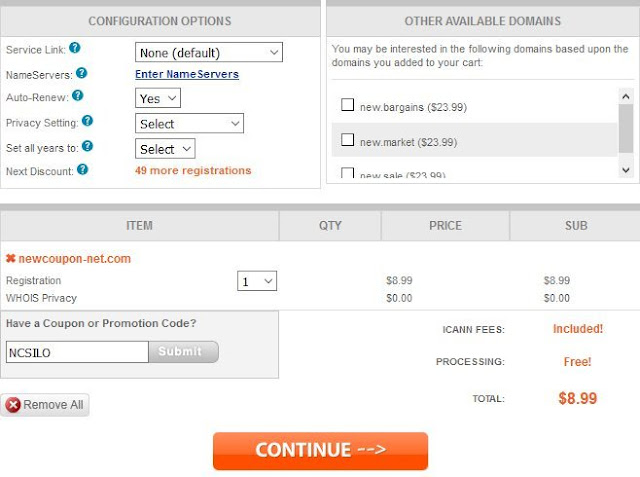
.Com registrations for just $8.99 at NameSilo, No limits
NameSilo just launched a big .Com promotion, for a limited time, you can register the .Com domain for just $5.99 for 1st year. No limits a...
-
 Hi guys, welcome again. How are you doing? This morning I was sitting in my lounge with my cup of coffee thinking about my new topic and I ...
 -
 Hosting, when I start this topic I was thinking I will finish this in one post like I did in my previous post, Hosting Services- For beginne...
 -
 GoDaddy has a bunch of pricing tiers and discounts. The best deal depends a lot on the size of your domain name portfolio. If you’re a dom...